
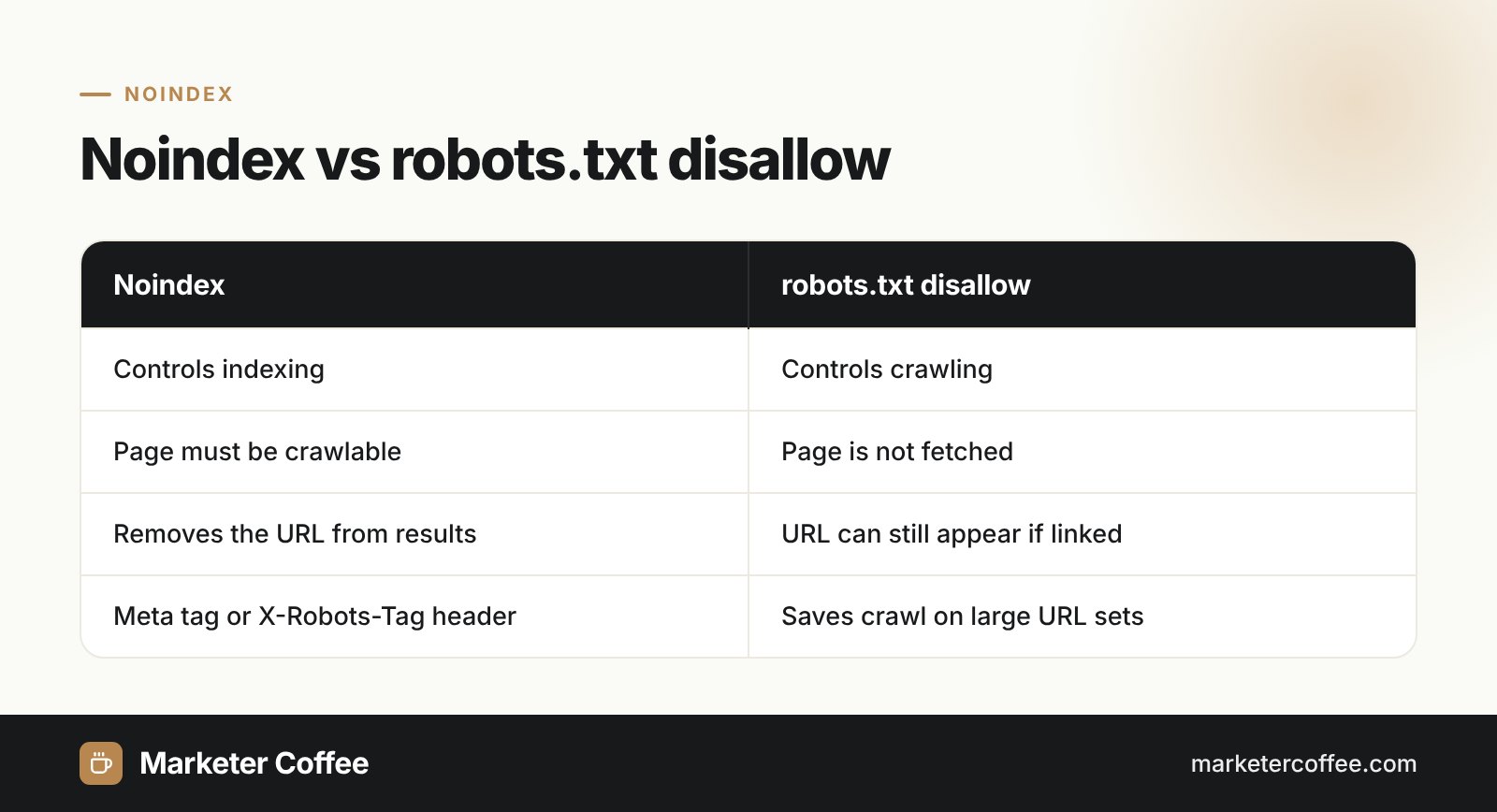
How does noindex work?
Noindex works by letting the crawler fetch the page but forbidding it from adding the page to the search index. Googlebot downloads the URL, finds the rule in the HTML head or in the response headers and drops the page from results. Crawling and indexing are separate steps: noindex controls the second one, while robots.txt controls the first.
Noindex syntax: meta tag and X-Robots-Tag
Google accepts 2 equivalent ways to set noindex: a robots meta tag in HTML and an X-Robots-Tag HTTP header. The header is the only option for PDFs, images and other non-HTML files.
Robots meta tag
Place the tag in the head of the page:
- <meta name=”robots” content=”noindex”> for all search engines that support the rule
- <meta name=”googlebot” content=”noindex”> for Google only
- <meta name=”robots” content=”noindex, nofollow”> to also stop link following (none is a Google shorthand for both)
X-Robots-Tag header
Send the rule in the server response, for example X-Robots-Tag: noindex. You can scope it to one crawler, as in X-Robots-Tag: googlebot: noindex. In Apache this is a Header set line in .htaccess, and in Nginx an add_header directive for the matching location.
Noindex and robots.txt: the classic mistake
Noindex and a robots.txt disallow cancel each other out when used on the same URL. If robots.txt blocks a page, Googlebot never fetches it, never sees the noindex and may still list the bare URL when other pages link to it. Google ended support for noindex lines inside robots.txt on 1 September 2019, after announcing the change on 1 July 2019. Its listed alternatives were the noindex meta tag or header, 404 and 410 status codes, password protection, a robots.txt disallow and the Search Console removals tool.
| Goal | Use |
|---|---|
| Keep the page out of results | noindex, crawling allowed |
| Save crawl on huge URL spaces | robots.txt disallow |
| Remove a URL fast, temporarily | Search Console removals tool |
| Delete the page for good | 404 or 410 status code |
When to use noindex in SEO
Use noindex for pages users need but searchers should never land on. Typical candidates are:
- Internal search result pages and thin filter combinations.
- Cart, checkout, account and thank-you pages.
- Staging, test and campaign landing pages built for paid traffic only.
- Tag archives and author pages with no unique value.
Do not use noindex to fix duplicate content inside one site. Google Search Central lists it as a mistake, because noindex removes the page completely instead of passing signals to the canonical URL. Never combine noindex with a canonical tag that points elsewhere, as the signals contradict each other.
Noindex on international sites
On multilingual sites noindex is a frequent and silent cause of missing markets. A noindexed page cannot be a valid hreflang target, so the whole language set loses that version. Google also says robots meta tags and robots.txt rules should be the same for every locale. In the launches I run in Germany and the Czech Republic, the most common incident is a new /de/ or /cz/ folder that goes live with the staging noindex still in the template; it shows up in Search Console’s page indexing report as “Excluded by noindex tag”. Set up a separate Search Console property per market folder so you see such errors per country.
Noindex and AI search
Noindex also removes a page from Google’s AI features, because pages shown in AI Overviews and AI Mode must be indexed and eligible for a snippet. Bing and other engines honor noindex too, but each engine decides its own interpretation, so check rules per engine when a market depends on Bing, Seznam or Yandex.
Indexing controls are part of every technical SEO review I do and of each market launch in my international SEO consultancy.
Frequently asked questions about Noindex
What is the difference between noindex and nofollow?
Noindex keeps the page out of search results, while nofollow tells crawlers not to follow the links on that page. You can combine them in one meta tag.
Can I put noindex in robots.txt?
No, Google stopped supporting noindex in robots.txt on 1 September 2019. Use a robots meta tag or the X-Robots-Tag header on a crawlable page instead.
How long does it take for noindex to work?
Noindex works after Googlebot recrawls the page, which can take from days to months depending on the page's importance. You can speed it up with the URL Inspection tool.
Does noindex remove a page from AI Overviews?
Yes, Google requires pages in AI features to be indexed and eligible for a snippet. A noindexed page is not shown in AI Overviews or AI Mode.
Related terms
- Block Search indexing with noindex · Google Search Central
- Robots meta tag, data-nosnippet, and X-Robots-Tag specifications · Google Search Central
- A note on unsupported rules in robots.txt · Google Search Central Blog
- Google to stop supporting noindex directive in robots.txt · Search Engine Land
- How to specify a canonical URL with rel="canonical" and other methods · Google Search Central
- <meta name="robots"> · MDN Web Docs