
How does the canonical tag work?
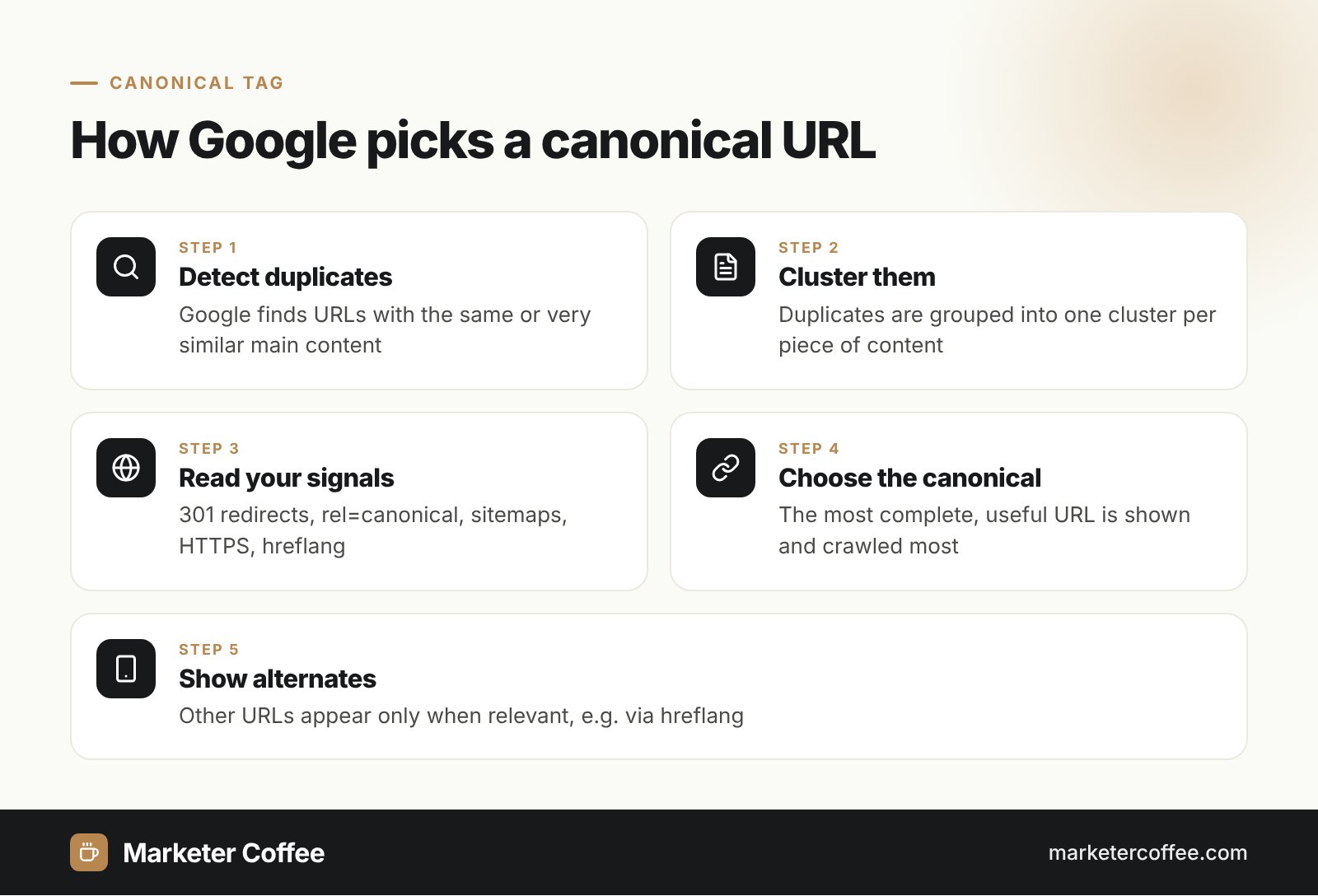
The canonical tag works by pointing every duplicate or near-duplicate URL to one representative URL, so search engines consolidate signals there. Google first clusters pages with the same or very similar main content, then picks one page per cluster as the canonical. That page is crawled most often and shown in results, while the other URLs become alternates. Your tag is one input to that choice: Google Search Central calls it a preference, not a rule.
A canonical tag sits in the head of the duplicate page and uses an absolute URL:
- <link rel=”canonical” href=”https://example.com/shoes/running/” />
For PDFs and other non-HTML files, send the same signal in an HTTP response header: Link: <https://example.com/guide.pdf>; rel=”canonical”.
Canonical tag history
The canonical link element was a joint announcement by Google, Yahoo and Microsoft on 12 February 2009, with Ask.com joining on 23 February 2009. At launch it only worked within one domain (subdomains included); Google extended support to cross-domain canonicals in December 2009, which made syndication between sites manageable.
| Date | Event |
|---|---|
| February 2009 | Google, Yahoo and Live Search launch rel=”canonical” |
| December 2009 | Google accepts cross-domain canonicals |
| Today | HTML tag, HTTP header and sitemap are all accepted signals |
3 ways to set a canonical URL
Google lists redirects and rel=”canonical” as strong signals and sitemap inclusion as a weak one. Combine them so they point to the same URL.
Permanent redirect
A 301 redirect or 308 is the strongest choice when the duplicate URL can disappear. Temporary 302 and 307 redirects do not act as a canonical signal in Google’s indexing pipeline.
rel=”canonical” tag or header
Use the tag when both URLs must stay live, for example filtered category pages or tracking parameters. Add a self-referencing canonical on the main page too.
XML sitemap
List only canonical URLs in your XML sitemap. This is easy to maintain on large shops but is the weakest hint.
Canonical tags on multilingual and multi-country sites
On international sites the canonical tag must point to a page in the same language, never to another language version. Language and country versions are linked with hreflang, not with canonicals; Google ignores rel=”canonical” that carries hreflang, lang, media or type attributes. Each localized page should therefore canonicalize to itself and list its siblings in the hreflang set.
The tricky case is same-language variants such as de-DE and de-AT, or en-GB and en-US with near-identical text. Google says these are duplicates and recommends both canonicalization and hreflang. In my German and Austrian rollouts I keep a self-canonical on each version and make the content truly different (prices, shipping, legal info), because if Google clusters them anyway, it picks one canonical and serves the other only through hreflang swapping. Search Console’s URL Inspection shows the user-declared and the Google-selected canonical per market, so check both after every launch.
Common canonical mistakes
- Canonicals that point from /pl/ or /cz/ pages to the English version.
- Canonical targets that redirect, return 404 or carry noindex.
- Blocking duplicates in robots.txt, which hides the tag from Googlebot.
- Different canonicals in the HTML, the HTTP header and the sitemap for one page.
- HTTP URLs in canonicals or sitemaps on an HTTPS site.
Canonical vs 301 redirect vs noindex
The canonical tag keeps the duplicate available to users while passing signals to the main URL, which is the difference from the other two tools:
| Tool | User sees duplicate? | Use it when |
|---|---|---|
| rel=”canonical” | Yes | Both URLs need to exist (filters, UTM, print) |
| 301 redirect | No | The old URL is retired for good |
| noindex | Yes | The page should never appear in search |
Google advises against using noindex to choose a canonical inside one site, because it removes the page entirely instead of consolidating it. A clean canonical setup is the first fix for duplicate content and it also matters for AI search: Google and Bing build AI answers on top of their index, so only the canonical URL realistically gets cited.
Canonical errors are one of the first things I check in a technical SEO review and in every international SEO consultancy project.
Frequently asked questions about Canonical tag
Is the canonical tag a directive or a hint?
The canonical tag is a hint. Google weighs it with redirects, sitemaps, HTTPS and internal links and may pick a different canonical when the signals conflict.
Should every page have a self-referencing canonical?
Yes, Google recommends adding a self-referencing canonical to the main page. It protects the URL against parameters, tracking codes and scrapers that create duplicates.
Can I use a canonical tag between language versions?
No, a canonical should point to a page in the same language. Language and country versions are connected with hreflang, and each of them should canonicalize to itself.
Does Google support cross-domain canonical tags?
Yes, Google has accepted cross-domain canonicals since December 2009. They are useful for syndicated articles or for the same product sold on two domains.
Related terms
- How to specify a canonical URL with rel="canonical" and other methods · Google Search Central
- What is URL canonicalization · Google Search Central
- Redirects and Google Search · Google Search Central
- Partnering to help solve duplicate content issues · Bing Webmaster Blog
- Handling legitimate cross-domain content duplication · Google Search Central Blog
- Learn about the Canonical Link Element in 5 minutes · Matt Cutts