
What is rendering?
Rendering is the step that executes a page’s code and builds the DOM, the structure from which text, links and images are read. A plain HTML page needs little rendering because the content is already in the source. A JavaScript application often sends an almost empty HTML shell, and the content exists only after scripts run. Search engines face the same choice as browsers: they either read the raw HTML or spend resources to render the page fully.
How does Google render pages?
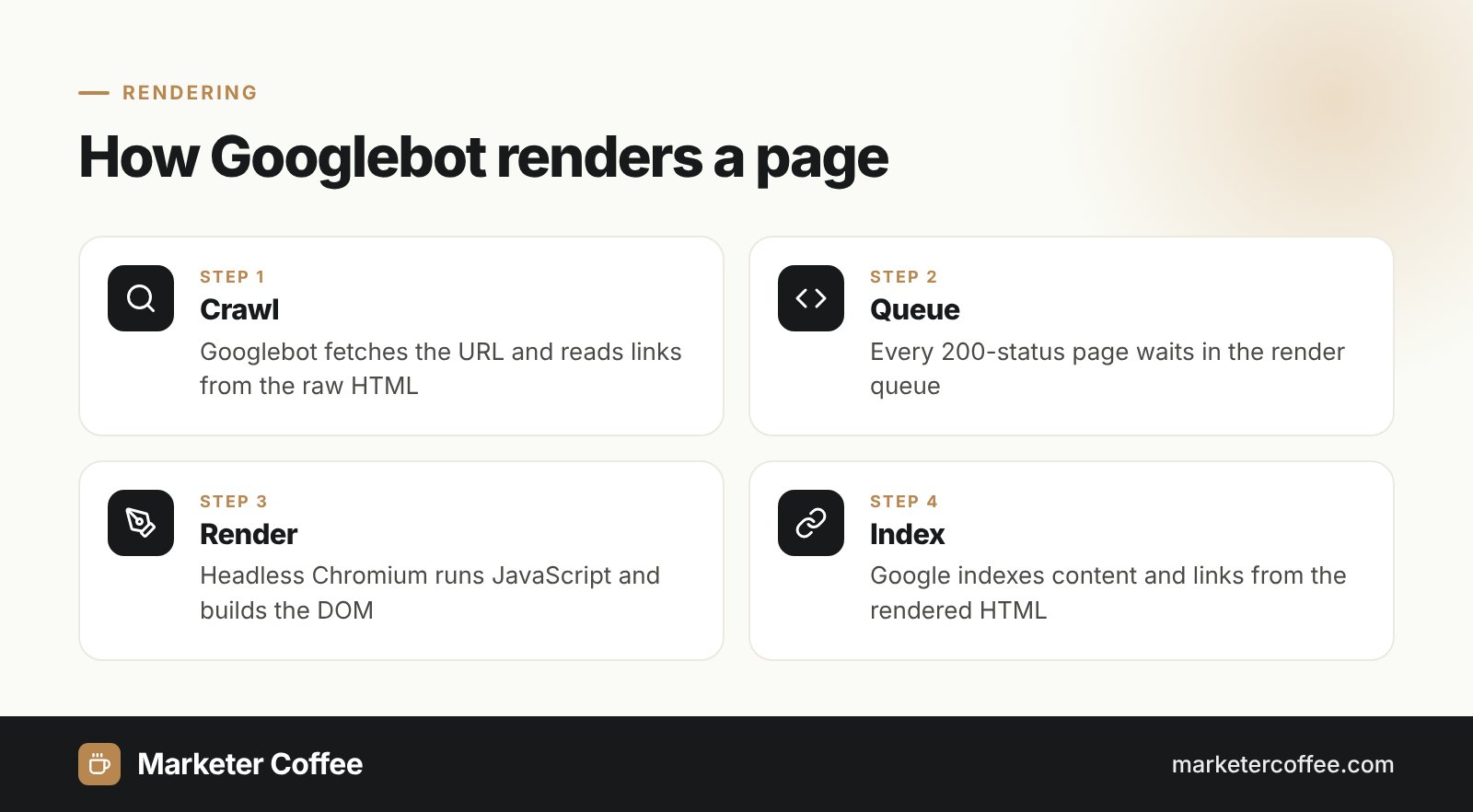
Google renders pages in a separate stage between crawling and indexing, using an evergreen version of headless Chromium. Google Search Central names three phases (crawling, rendering, indexing), which run in four steps:
- Crawl the URL with Googlebot, check robots.txt and read links from the raw HTML.
- Queue every page with a 200 status for rendering, whether it uses JavaScript or not.
- Render the page in headless Chromium when resources allow, then read new links and content from the rendered HTML.
- Index the rendered version of the page.
The render queue is the reason JavaScript content can appear in Google later than HTML content. In the Vercel and MERJ data from nextjs.org, 25% of pages were rendered within 4 seconds, 75% within 26 seconds and 90% within about 3 hours. The same study found that 100% of indexable HTML pages were eventually fully rendered, which also shows that rendering spends part of the site’s crawl budget and server resources.
Types of rendering
Web developers choose between four main rendering strategies, described by Addy Osmani and Jason Miller in the web.dev guide “Rendering on the Web”.
Server-side rendering (SSR)
Server-side rendering means the server builds full HTML for every request. Bots receive complete content at once, which makes SSR the safest option for SEO on dynamic sites.
Static rendering (SSG)
Static rendering means HTML is generated once at build time and served from a CDN. It suits blogs, documentation and landing pages that change rarely.
Client-side rendering (CSR)
Client-side rendering means the browser downloads JavaScript that fetches data and builds the page. Without server help, bots that do not run JavaScript see an empty page.
Hydration and dynamic rendering
Hydration means server-rendered HTML becomes interactive after client scripts attach to it, the default model in frameworks such as Next.js and Nuxt. Dynamic rendering, which serves prerendered HTML only to bots, is called “a workaround and not a recommended solution” in Google’s documentation.
Why rendering matters for SEO and AI search
Rendering matters because content that exists only after JavaScript runs is invisible to many crawlers. Google renders, but Vercel’s December 2024 analysis found that none of the major AI crawlers render JavaScript: GPTBot, OAI-SearchBot, ClaudeBot, PerplexityBot and Bytespider read only the initial HTML. Gemini, which uses Googlebot’s infrastructure, and Applebot are the exceptions. A client-side rendered product page can therefore rank in Google and still be missing from ChatGPT or Perplexity answers, which hurts Generative Engine Optimization.
In SaaS and e-commerce audits I see three recurring problems: product descriptions loaded by scripts, internal links built from JavaScript click handlers instead of <a href> tags, and canonical or hreflang tags injected only after rendering. I cover the full checklist in the guide to on-page SEO.
SSR vs CSR for SEO
| Aspect | Server-side rendering | Client-side rendering |
|---|---|---|
| Content in initial HTML | Yes | No, built by JavaScript |
| Googlebot | Indexed at once | Indexed after the render queue |
| AI crawlers (GPTBot, ClaudeBot) | See the content | See an empty shell |
| Server cost | Higher | Lower |
| Best for | Shops, blogs, landing pages | Logged-in dashboards, apps |
Frequently asked questions about Rendering
Does Google render JavaScript?
Yes, Google renders JavaScript with an evergreen headless Chromium in a separate stage after crawling. Rendering can be delayed, so server-side rendering is still recommended for important content.
What is the difference between SSR and CSR?
SSR builds full HTML on the server for every request, while CSR builds the page in the browser with JavaScript. SSR gives bots complete content immediately, CSR relies on the bot executing scripts.
Do AI crawlers render JavaScript?
Most do not. Vercel reported in December 2024 that GPTBot, ClaudeBot, PerplexityBot and other major AI crawlers fetch only the initial HTML, while Gemini and Applebot render pages.
Is dynamic rendering still recommended?
No, Google calls dynamic rendering a workaround and not a recommended solution. It recommends server-side rendering, static rendering or hydration instead.
Related terms
- Understand the JavaScript SEO basics · Google Search Central
- Dynamic rendering as a workaround · Google Search Central
- Rendering on the Web · web.dev (Google)
- How Google handles JavaScript throughout the indexing process · Vercel and MERJ
- The rise of the AI crawler · Vercel