
How does crawling work?
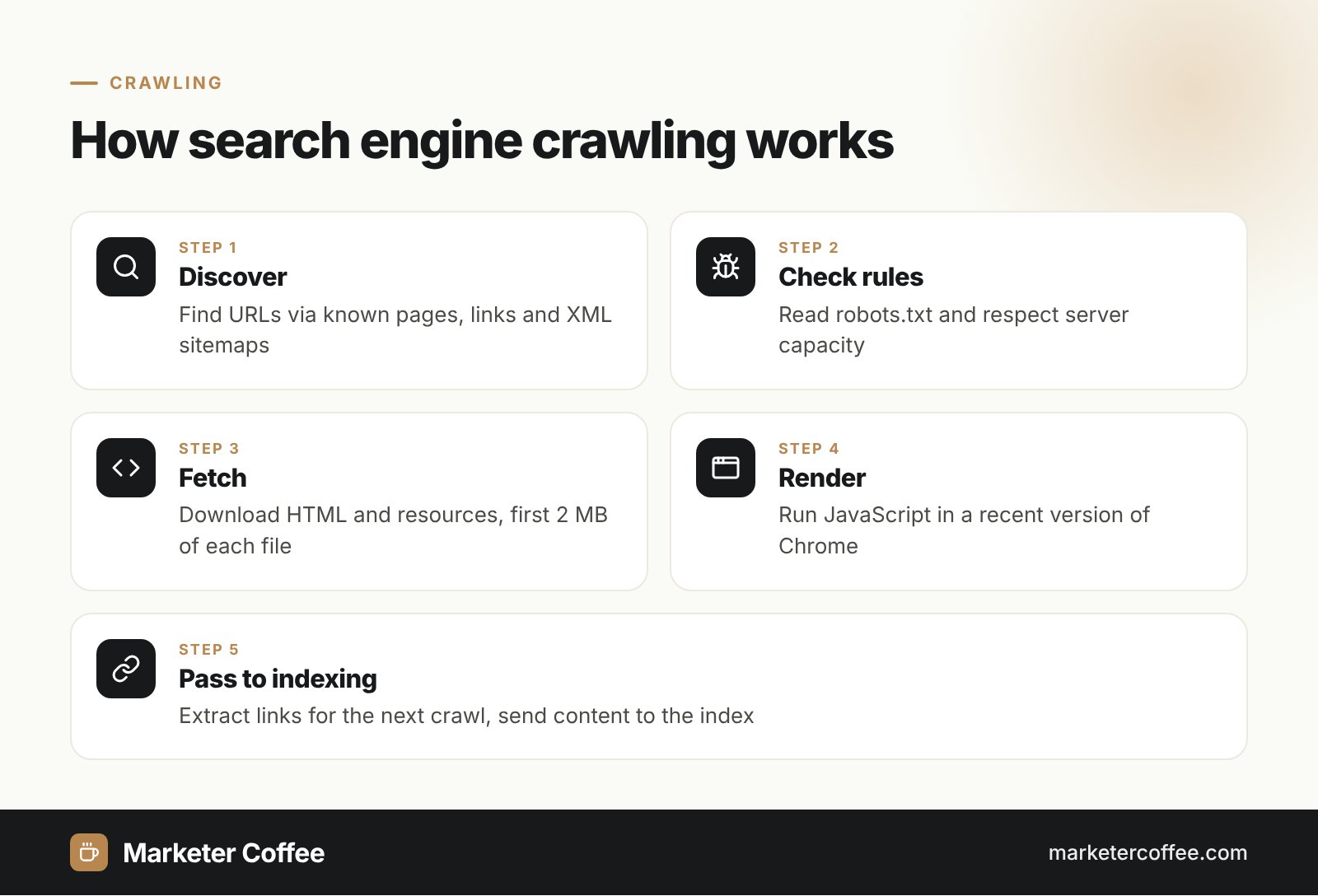
Crawling works as a loop of discovering URLs, fetching them and extracting new links to fetch next. Google says there is no central registry of web pages, so it finds URLs in 3 main ways: revisiting pages it already knows, following links from those pages and reading XML sitemaps submitted by site owners. An algorithm then decides which sites to crawl, how often and how many pages to fetch from each.
Discovery
Every internal and external link is a potential discovery path. Pages with no links pointing to them (orphan pages) are found only through sitemaps, if at all, which is why internal linking is a crawling issue as much as a ranking one.
Fetching
Googlebot downloads the HTML and each referenced resource (CSS, JavaScript) separately, each under the same 2 MB uncompressed limit; PDFs get 64 MB. Google says Googlebot should not request pages from most sites more than about once every few seconds on average.
Rendering
During crawling Google also renders pages with a recent version of Chrome and runs their JavaScript, because some content appears only after scripts execute.
Crawling vs indexing
Crawling and indexing are 2 separate stages: crawling downloads a page, indexing decides whether to store it. A crawled page can still be left out of the index, and a page blocked from crawling can still appear in results as a bare URL if other sites link to it.
| Aspect | Crawling | Indexing |
|---|---|---|
| What happens | Bot fetches the URL | Google analyses and stores the page |
| Controlled by | robots.txt, server responses, links | noindex, canonical, content quality |
| Search Console report | Crawl stats | Page indexing |
Use robots.txt to stop crawling and a noindex tag to stop indexing; never both on the same URL, because a blocked page cannot show its noindex. More in the entry on indexing.
What blocks crawling?
Crawling is blocked mainly by server problems, network issues and robots.txt rules that disallow Googlebot, according to Google. Pages behind a login are also out of reach. Server responses steer the crawl rate: repeated 5xx errors or a 429 status make Google slow down, while fast, stable responses let it crawl more.
Crawl budget and crawl demand
Crawl budget is the number of URLs Google can and wants to crawl on a site, set by crawl capacity and crawl demand. Google says it matters mainly for sites with over 1 million unique pages that change weekly, or over 10,000 pages that change daily. Duplicate and parameter URLs waste it, so read the crawl budget entry before blaming slow indexing on Google.
Crawling multilingual and multi-country sites
Crawling multilingual sites requires a separate, linkable URL for every language and country version. Google states that Googlebot’s default IP addresses appear to be in the USA and that it sends requests without an Accept-Language header. A site that switches language by IP or browser settings on one URL therefore shows Googlebot mostly the US or English version, and the German or Polish content may never be crawled. I fix this on international projects with 3 rules:
- Give every locale its own URL (ccTLD, subdomain or subdirectory).
- Link all versions with hreflang and a visible language switcher.
- Keep robots.txt and robots meta rules identical across locales.
Google treats each hostname as a separate site for crawl budget, so de.example.com and example.com/de/ behave differently on large stores.
Crawling beyond Google: Bing, IndexNow and AI bots
Other engines crawl too, and some accept push notifications. IndexNow lets a site notify Microsoft Bing, Naver, Seznam.cz, Yandex and Yep about new or changed URLs, up to 10,000 URLs per request, and participating engines share submissions with each other. For Czech expansions this matters because Seznam is a participant. AI crawlers from OpenAI, Anthropic and Perplexity also fetch pages, so blocking them in robots.txt removes your content from those assistants’ answers; I review these rules as part of AI SEO (GEO) work.
Not sure Google sees all your markets? A technical SEO audit and my international SEO consultancy start with crawl analysis.
Frequently asked questions about Crawling
What is the difference between crawling and indexing?
Crawling is when a bot downloads a page, indexing is when the search engine analyses and stores it. A page can be crawled and still not be indexed if Google judges it duplicate or low value.
How do I get Google to crawl my site?
Link new pages from already indexed pages, list them in an XML sitemap and submit the sitemap in Search Console. For single urgent URLs, use the URL Inspection tool to request indexing.
How often does Google crawl a website?
Google crawls each site at its own rate, based on server capacity, popularity and how often content changes. For most sites, Googlebot averages no more than about one request every few seconds.
Does robots.txt stop a page from appearing in Google?
No, robots.txt stops crawling, not indexing. A blocked URL can still appear in results if other pages link to it, so use a noindex tag on a crawlable page to keep it out.
Related terms
- In-depth guide to how Google Search works · Google Search Central
- Googlebot · Google Search Central
- Crawl budget management for large sites · Google Search Central
- How Google crawls locale-adaptive pages · Google Search Central
- IndexNow documentation · IndexNow.org